
Senior Account Manager, Business Development
While the upfront costs of DevOps implementation, including time and training, can be considerable, the potential rewards—like quicker time-to-market, better collaboration, higher reliability, and reduced costs over time—make it a smart investment.
In 2026, for CTOs and Engineering Managers, the shift to the cloud is no longer a question of “if,” but “how efficiently.” As organizations scale their digital transformation efforts, the tools that power these initiatives become significant line items in the IT budget. Azure DevOps has emerged as a dominant force in the enterprise CI/CD landscape, offering a robust, all-in-one ecosystem for planning, developing, testing, and delivering software.
However, Microsoft’s pricing model can be as complex as the architectures it supports. Without a clear strategy, “pay-as-you-go” can quickly turn into “pay-more-than-you-planned.” Thus, understanding the nuances of Azure DevOps pricing can help you optimize your Total Cost of Ownership (TCO). This guide serves as your comprehensive Azure estimator and budget planner for 2026.
Is Azure DevOps Free? Understanding the Free Tier
One of the most common questions from startups and small teams is: “Is Azure DevOps free?” The answer is a qualified “yes,” but understanding the boundaries of this free tier is critical for enterprise planning.
What’s Included in the Azure DevOps Free Plan
Microsoft offers a generous entry point designed to get teams hooked on the ecosystem. The free tier includes:
- First 5 Users: Free access to Basic features (Boards, Repos, Pipelines, Artifacts).
- Azure Pipelines: One free Microsoft-hosted job with 1,800 minutes per month for CI/CD, and one self-hosted job with unlimited minutes.
- Azure Boards: Work item tracking and Kanban boards.
- Azure Repos: Unlimited private Git repositories.
Free User Limits and Limitations
While excellent for pilots, the free tier has hard ceilings. The 1,800-minute limit on hosted pipelines evaporates quickly in an active agile sprint. Furthermore, the free tier does not include the “Basic + Test Plans” license, meaning comprehensive test management features are locked behind a paywall immediately.
When You’ll Need to Pay
You cross the threshold from free to paid the moment you add a 6th user, require more parallel processing power to speed up builds, or need sophisticated test management capabilities. For most enterprise clients we work with, the free tier is a sandbox, not a production strategy.
Azure DevOps Pricing Breakdown: Complete Cost Structure
To accurately forecast your Azure DevOps cost, you must deconstruct the bill into its four primary components: Users, Pipelines, Storage, and Administration.
User Licensing Costs (Basic, Basic + Test Plans, Stakeholder)
Azure DevOps uses a per-user/per-month model:
- Stakeholder (Free): Unlimited users. Ideal for business executives or project managers who need to view progress and add items to the backlog but do not code or run pipelines.
- Basic Plan (~$6/user/month): The standard license for developers. Includes access to Repos, Boards, and Pipelines. The first 5 are free; you pay for the 6th onwards.
Basic + Test Plans (~$52/user/month): A significant jump in price. This license is required for QA professionals who need to design, execute, and track manual test cases.
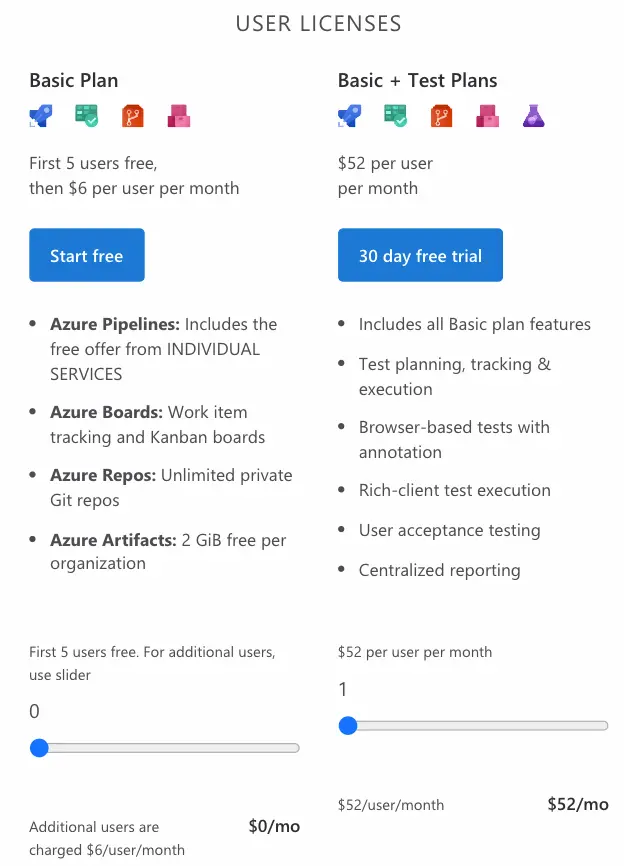
Source: Azure DevOps Services
Azure Pipelines Pricing (Hosted and Self-Hosted Agents)
This is where the hidden costs often lie.
- Microsoft-Hosted Agents: You pay for the convenience of Microsoft managing the infrastructure. After the free tier, you pay roughly $40 per parallel job (with unlimited minutes). If you have 50 developers trying to merge code simultaneously, a single parallel job creates a massive bottleneck.
- Self-Hosted Agents: You pay roughly $15 per parallel job, but you must provide the infrastructure (VMs) yourself. This lowers the license cost but adds infrastructure management overhead.
Azure Artifacts Storage Costs
Your build artifacts (NuGet, npm, Maven packages) consume storage. The first 2 GB is free. Beyond that, pricing creates a sliding scale (approx. $2/GB), which can accumulate silently if retention policies are not configured correctly.
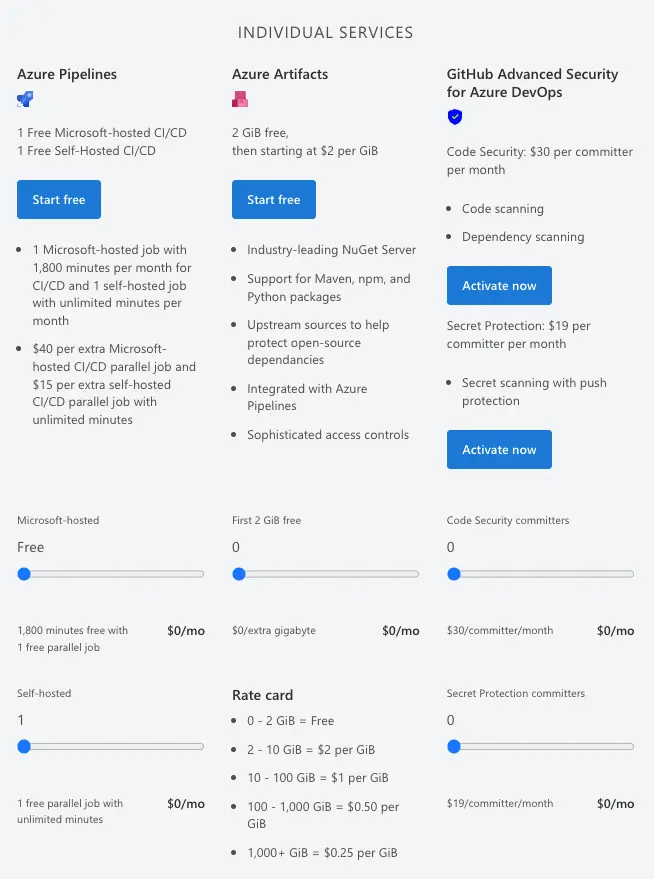
Source: Azure DevOps Services
Azure Active Directory (AAD) and Security Features
While AAD (now Microsoft Entra ID) is technically separate, enterprise security integration is a hidden cost driver. Premium features like Conditional Access or P2 licenses for enhanced security are often prerequisites for compliant DevOps environments in regulated industries.
Azure DevOps Estimator: How to Calculate Your Costs
Forecasting your spend requires a structured approach. You need a reliable Azure estimator strategy that accounts for growth.
Estimating User Counts and Access Levels
Start by auditing your team. How many are “Consumers” (Stakeholders) vs. “Contributors” (Developers) vs. “Testers”?
- Tip: Do not buy “Basic + Test Plans” for everyone. Only your dedicated QA Engineers need it. Developers running unit tests usually only need “Basic.”
Calculating Pipeline and Agent Costs
This is the math of velocity. If your build takes 10 minutes and you have 20 commits a day, that is 200 minutes per day.
- Formula: (Avg Build Time) x (Daily Commits) x (Team Size) = Daily Minutes.
- If this exceeds 1,800 minutes/month, you need paid parallel jobs.
Forecasting Storage and Artifacts Expenses
Look at your current repo size and build output. If you are migrating a monolith, your artifact sizes will be large. Plan for at least 10-20 GB of artifact storage per active project initially.
Using Microsoft’s Cost Estimator Tool
Microsoft provides an official Azure Pricing Calculator that acts as your primary Azure estimator.
- Navigate to the calculator.
- Search for “Azure DevOps.”
- Input your user tiers and desired parallel jobs.
- The tool provides a monthly estimate, but remember, it does not account for the infrastructure costs of self-hosted agents (VMs, bandwidth).
Factors Affecting Your Azure DevOps Costs
Why does one company pay $500 and another pay $5,000 for the same team size? This is a common question our clients often ask, and here we will try to answer it:
Team Size and User Access Levels
The ratio of “Basic” to “Test Plans” users is the biggest lever. Over-provisioning Test Plan licenses is the most common source of waste we see during our audits.
Pipeline Parallelization and Build Minutes
Speed costs money. If you want “zero wait time” for builds, you need massive parallelization. Balancing “developer wait time” (salary cost) vs. “pipeline cost” (tool cost) is a key decision for the CTO.
Storage and Artifact Management Requirements
Binary-heavy projects (e.g., game development, IoT firmware) eat storage budgets. Text-based microservices are cheap.
Support Plan Selection
Do not forget the cost of support. Standard Azure Support plans range from $29/mo to $1000/mo, depending on your SLA requirements for response times.
Cost Optimization Strategies for Azure DevOps
To keep your Azure DevOps costs sustainable, you should implement these governance policies.
Maximizing Free Tier Usage
Ensure every Stakeholder is actually assigned a “Stakeholder” license, not a “Basic” one by default. Regularly audit user lists to remove inactive accounts.
Reducing Parallel Job Overcommitment
Use self-hosted agents for heavy workloads. You can run self-hosted agents on “Spot Instances” (Azure Spot VMs) to save up to 90% on compute costs.
Artifact Storage Cleanup and Management
Configure Retention Policies in Azure DevOps. Automatically delete build artifacts older than 30 days. There is rarely a business need to keep the binary of a feature branch from six months ago.
Leveraging Visual Studio Subscriptions
This is the “Pro Tip.” If your developers have Visual Studio Enterprise subscriptions, their Azure DevOps “Basic” and even “Test Plan” usage is often included. Check your Microsoft licensing agreement before buying standalone DevOps licenses.
Azure DevOps Server vs. Azure DevOps Services: Cost Comparison
One of the most critical architectural decisions you will make is deployment: should you host the platform yourself (Azure DevOps Server) or consume it as a SaaS product (Azure DevOps Services)? This choice fundamentally alters your cost structure.
On-Premise Server Pricing Model
With Azure DevOps Server, the visible cost is the Server License and Client Access Licenses (CALs). However, the hidden costs below the surface are massive. You bear the full financial burden of:
- Infrastructure: Hardware, electricity, and cooling.
- Additional Licensing: Windows Server and expensive SQL Server Enterprise licenses.
- Maintenance: The salary cost of SysAdmins spending hours on patches, upgrades, and downtime management.
Cloud-Based Services Pricing Model
Azure DevOps Services is a pure SaaS model (Operational Expenditure). The monthly per-user fee is all-inclusive, covering compute, storage, security, and automatic updates. You eliminate the “maintenance tax” entirely, allowing your team to focus on shipping code rather than managing build servers.
When Each Option Makes Financial Sense
- Choose Cloud (Services): The best financial choice for 95% of businesses. It offers the lowest Total Cost of Ownership (TCO) and zero maintenance overhead.
- Choose Server (On-Prem): Only viable for highly regulated industries (e.g., Defense, Banking) where strict data sovereignty laws legally prohibit public cloud use. In this case, the higher cost is a necessary compliance premium.
Migration Cost Considerations
Moving from On-Prem to Cloud incurs a one-time “migration effort,” but by retiring expensive hardware and SQL licensing, most organizations realize a full Return on Investment (ROI) within 12 months.
Jalasoft’s Cost-Effective DevOps Solutions
Tools are only as expensive as the inefficiency they hide. The real cost of DevOps isn’t the license; it’s the friction in your delivery process or wrong estimation.
Nearshore DevOps Services vs. Platform Costs
Hiring a US-based DevOps Engineer can cost $150k+ annually. By partnering with Jalasoft, you access elite,technology-fluent engineering talent from Latin America. Our nearshore model provides time-zone alignment (CST/EST) and cultural fit, reducing the “communication overhead” that plagues offshore outsourcing.
Reducing Implementation and Training Expenses
Because our engineers are trained through our unique Jala University model, they arrive ready to contribute. You save the massive hidden cost of recruiting, onboarding, and upskilling internal staff on complex Azure configurations.
Cost Optimization and Architecture Planning
OurSoftware DevOps solutions go beyond staffing. Our architects review your pipeline to reduce build times (saving pipeline costs) and optimize infrastructure (saving cloud costs). We help you overcome commonDevOps challenges, ensuring your spend translates directly to feature velocity.
Why Partner with Jalasoft for Budget-Conscious DevOps
We leverage cutting-edge innovations, includingAI in DevOps, to automate cost governance. Whether you are migrating from on-prem to the cloud or trying to rein in a sprawling Azure bill, Jalasoft provides the technical stewardship to turn DevOps from a cost center into a competitive advantage.
Stop guessing your cloud budget. Building a custom software solution requires precision in both code and cost.Contact Jalasoft today for a consultation on how to optimize your DevOps strategy for both performance and price.